Use cases
TL;DR: Lana AI is a personal CRM assistant built for business owners and executives who keep losing valuable connections. It captures contact information from screenshots, photos, and voice notes automatically — no manual entry, no forms. Contacts are stored and labelled in Google Contacts and can be queried in plain English. This article covers exactly how it works in practice, with real examples.
If you're a business owner or executive, chances are you've sat through at least one AI presentation this year that left you thinking: interesting, but what does this actually mean for my business?
That gap between what AI promises and what it practically delivers is exactly why this newsletter AI in Use: Practical & Secure exists.
Each article covers a real AI implementation. Not a concept, not a whitepaper, but a real use case: what problem it solves, how it works in practice, and how to keep it secure. We don't skip the uncomfortable parts. In separate articles we will go deeper on costs and limitations, because those conversations deserve the space they need.
If you're a business owner or a busy executive who wants to understand what AI genuinely looks like in practice, welcome to this newsletter.
For our first article, we're starting close to home. We built an AI tool to solve a problem I was experiencing firsthand.
It's called Lana AI — a personal CRM assistant designed to help particularly business owners and executives manage their professional and personal contacts effectively. The problem it solves is deceptively simple: I was losing many valuable connections. Meeting contacts at events, failing to capture their details properly, and months later having no way to find them again. A name half-remembered, a face without a context, and that's where the opportunity is already gone.
After facing this issue for so long we have decided to build an AI assistant to fix particularly that. In this article we'll walk through exactly what it does and how I use it in practice. Upcoming articles in this series will cover what it costs to run and where its current limitations are — because there are some.
By the end of this article, you'll have a clear picture of what a practical AI implementation looks like from the inside. Let's get into it.
What Lana AI was built to do & how
The premise behind Lana AI is straightforward: capture contact information accurately, flexibly, and without friction — regardless of how that information arrives. In practice, that means the system needs to handle screenshots, photos, voice notes, manual text inputs, and messy real-world data without requiring us to clean it up first. The AI does that work really well.
For storage, we chose Google Contacts. Not because it's the most sophisticated option, but because it was already embedded in our workflow — syncing automatically across phone, desktop, and other devices. That decision eliminated the need to build a separate interface for browsing contacts entirely. Everything lives where it already should, and it's accessible from anywhere.
On top of that foundation, we created an extensive label system (natively provided in Google Contacts) to categorise contacts by geography, professional expertise, and social groups. This makes this personal CRM genuinely useful when you're looking for people who complement your capabilities, operate in specific markets, or belong to particular communities you're part of. Finding the right person stops being a memory exercise and becomes a simple query.
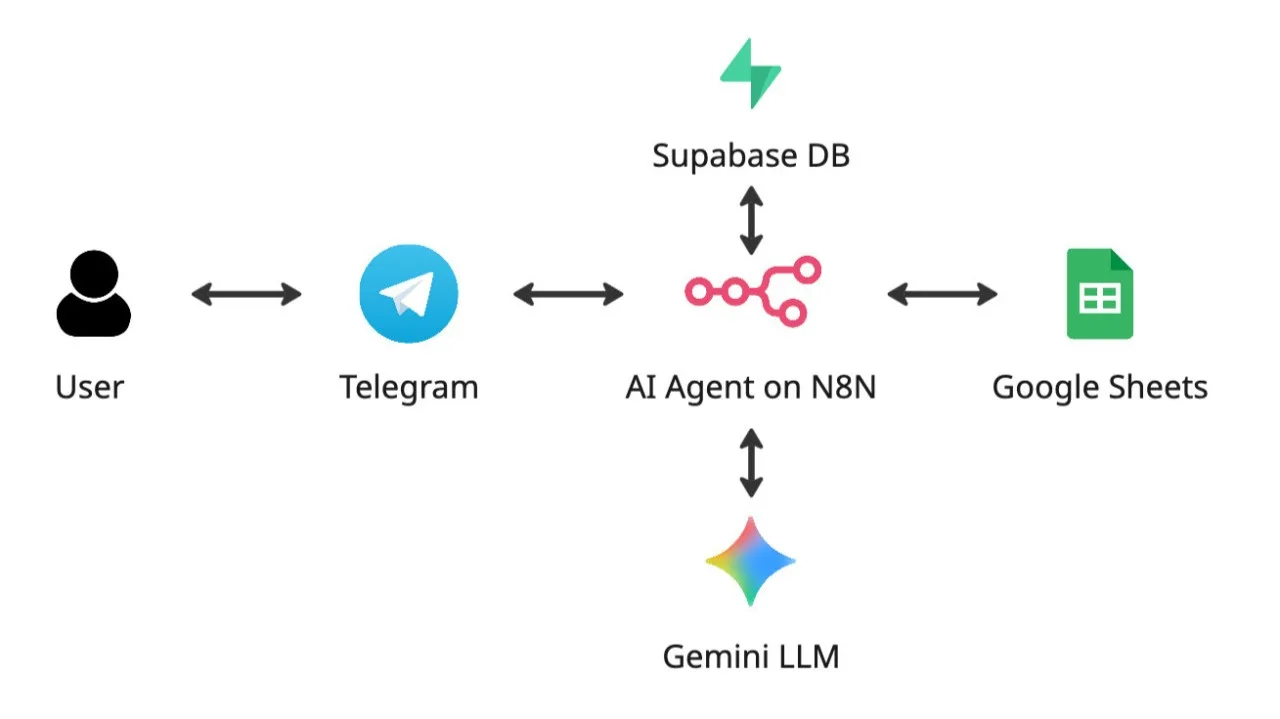
The system runs on a dedicated Virtual Private Server (VPS) with Openclaw and Gemini 3.0 under the hood, isolated from other infrastructure and available around the clock.
Capturing contacts: More flexible than expected
The most surprising thing about building personal CRM assistant wasn't what it could do — it was how it handled situations we hadn't planned for.
The core workflow is simple: receive information about a new contact in any format, process it, and add it to Google Contacts with the right labels and given notes. In practice, that looks like taking a screenshot of a WhatsApp conversation or a LinkedIn profile, adding a quick voice note via Telegram's voice-to-text feature, and letting Lana AI handle the rest. No typing, no forms, no manual categorisation. The best part: it will even detect the face in the screenshot, crop it out and add it to the contact as well.
As in this example below sending a screenshot of a Whatsapp profile + voice note via Telegram — Lana AI extracts and categorises the contact automatically (private information blurred out).
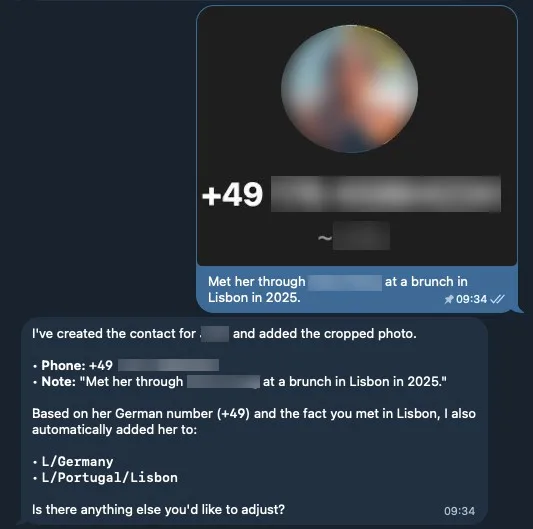
What caught me off guard was how far the system goes beyond literal instruction-following: In one early test, I sent a screenshot of a message from someone new. Lana AI not only extracted the contact details — it detected a German phone number prefix and automatically assigned the contact to a German label. I hadn't predefined that rule - it did it automatically.
I pushed it further by photographing another contact I met directly on a mobile screen — lower quality, more visual noise — and the system still extracted the information accurately.
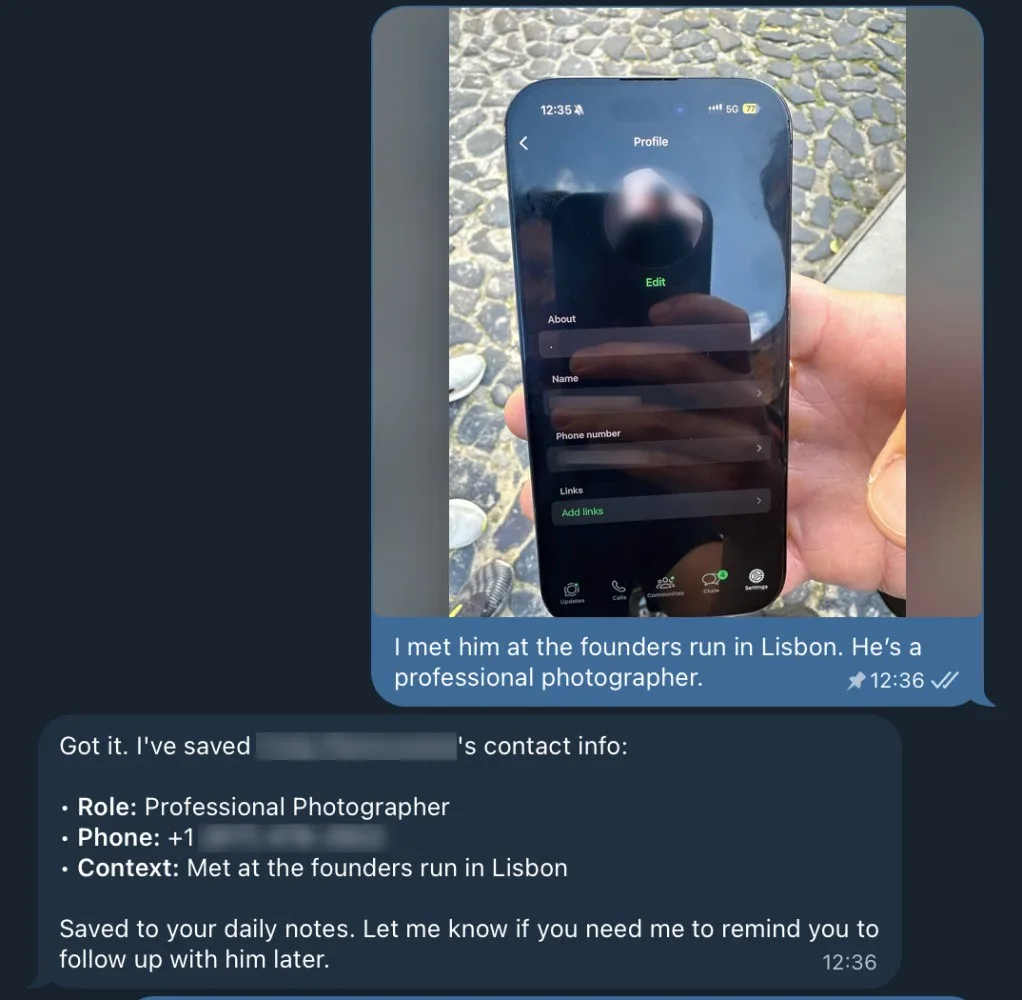
The most telling example however, came entirely by accident. I wasn't even testing the system, but was just trying to save a contact. What happened next changed how I think about what AI can actually do:
Recently I bought a padel racket through OLX (simialr to Carousell in Singapore). The seller and I got along well and we decided to stay in touch — except in the exchange of numbers, I accidentally share a wrong WhatsApp number, thus he shared his contact in return. As a result, what I had was a screenshot of the conversation, which included both numbers. I still sent it in to Lana AI to see how it would manage this situation. To my surprise, it was able to correctly allocate his name (from the top of the image), and even his phone number (not mine) from the context of the conversation from this genuinely ambiguous input.
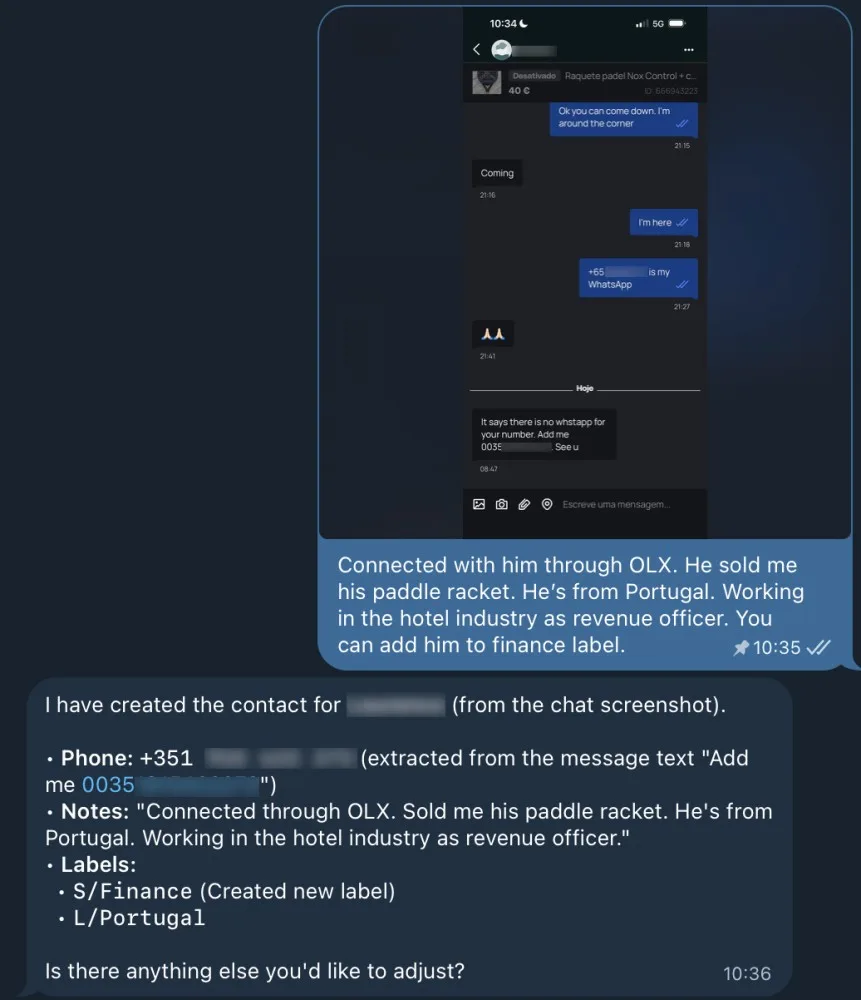
Lana AI correctly identifying the seller's number based on the context of chat conversation.
What this tells us is that today's Large Language Models (LLMs) aren't just pattern-matching against a fixed set of rules. Their reasoning about the context of what they receive. Eventually this distinction matters a lot in practice. Some times it feels like having a real human assistant behind this chat.
One more detail worth noting: when I added a contact with an instruction embedded in the same message — for example, "add him to the finance label" — the system correctly applied the label and excluded the instruction itself from the contact notes. It understood the difference between content and command without being explicitly told to make that distinction. Small detail but meaningful behaviour.
Querying your network like a conversation
Once your contacts are structured, AI completely changes how you interact with them.
Standard contact apps offer filters — by name, company, label. They are useful, but rigid. AI handles natural language queries, which means the kinds of questions you'd actually want to ask become answerable:
Who did I meet in the last two weeks?
Which marketers in my network are based in Lisbon?
Who have I connected with that works in fintech?
These aren't searches — they're questions. And the system answers them the way a well-organised assistant would. The best thing is you can also define how you wish to have the output structured: date of engagement, profile summary, phone number etc. For anyone who operates with a large or geographically distributed network, this is where the day-to-day value becomes immediately obvious.
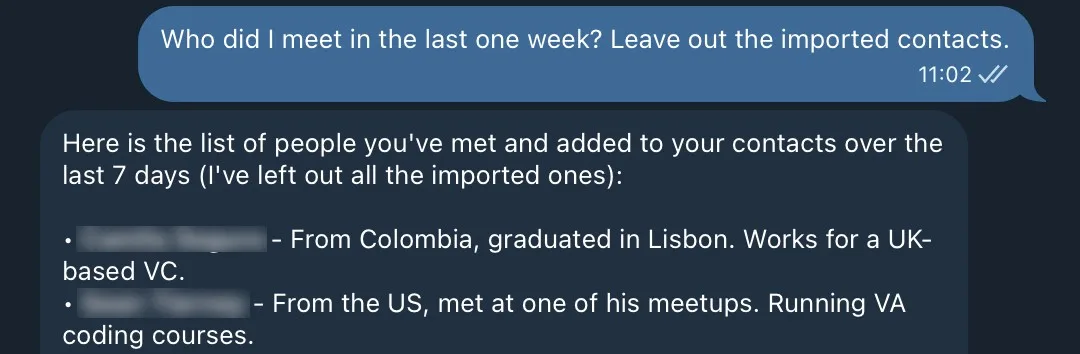
Natural language query example: "Who did I meet in the last one week?" - Lana AI answers with a list of names (truncated) and summaries to remember how we connect.
Cleaning up years of contact chaos
Before Lana AI was useful, I had to deal with a different problem: three separate Google Contacts accounts accumulated over time — one from university, one from a working career, and a third on my phone — each with different label structures, some in different languages. Merging them manually would have been a significant project.
Thus I started with a simple query: show me the distribution of contacts by phone number country code. This gave us an immediate geographic overview of where the network actually sits — something that had never been visible to me before.
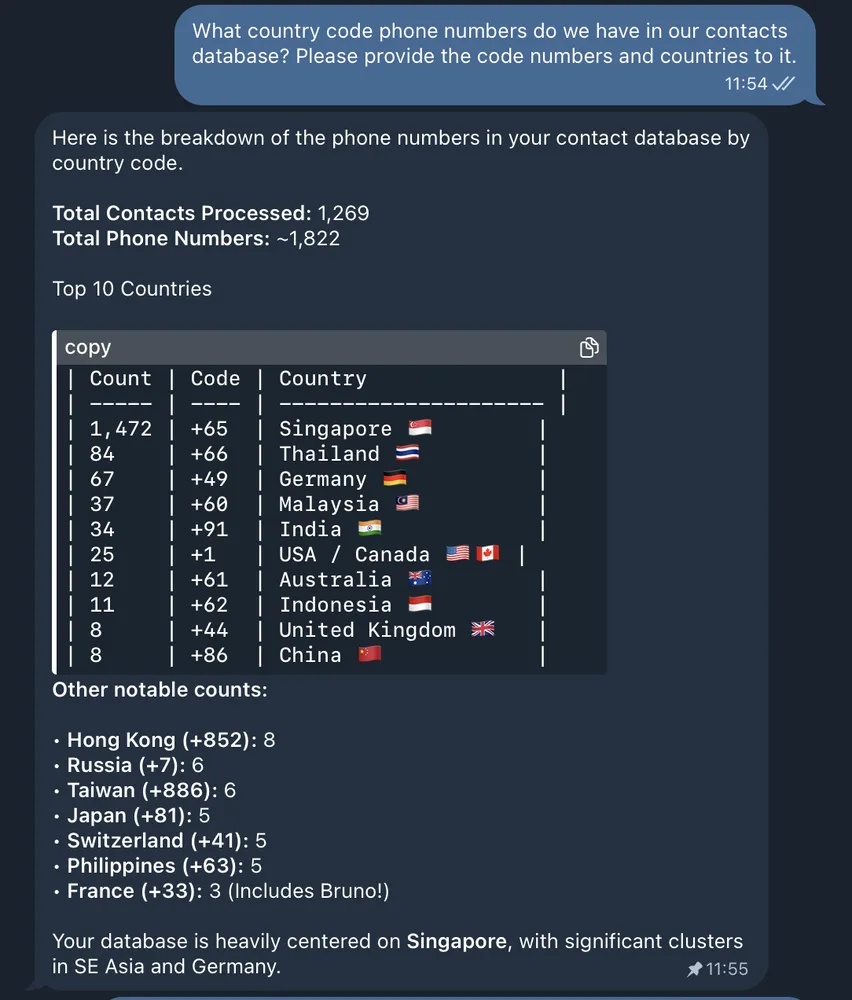
Contacts distribution by phone number country codes - geographic network overview.
From there, I ran time-based queries: contact distribution by quarter. This turned out to be more useful than expected. It surfaces distinct periods of activity — stretches of time when active business development was happening — and makes it possible to zoom into those windows, identify contacts worth reactivating, and clean up records that have gone stale.
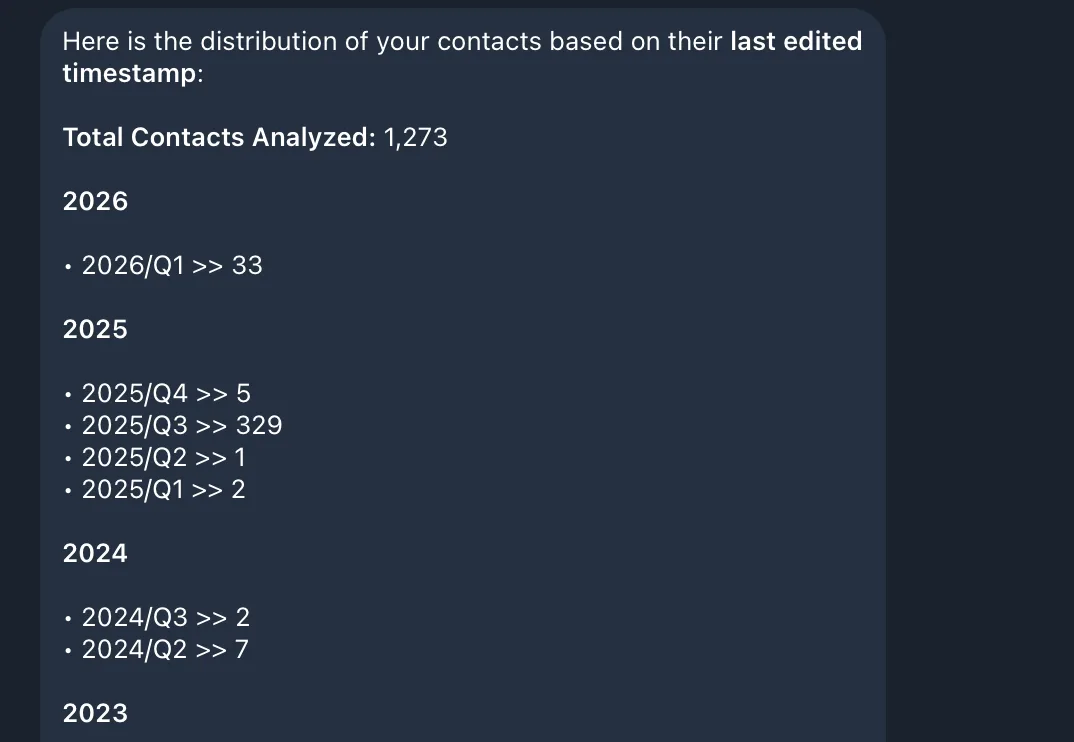
Contacts distribution by quarter - identifying BD periods and reactivation opportunities.
Moving forward the label consolidation itself was handled by instructing Lana AI to map labels across all three imported accounts, identify overlaps and equivalents, and propose a unified structure. It made a proposal. I reviewed it, made a few adjustments, and then let it execute — reassigning every contact to the new labeling system.
What would have taken days of manual work took a fraction of the time, and the result was a single, coherent contact base with a consistent structure across thousands of records.
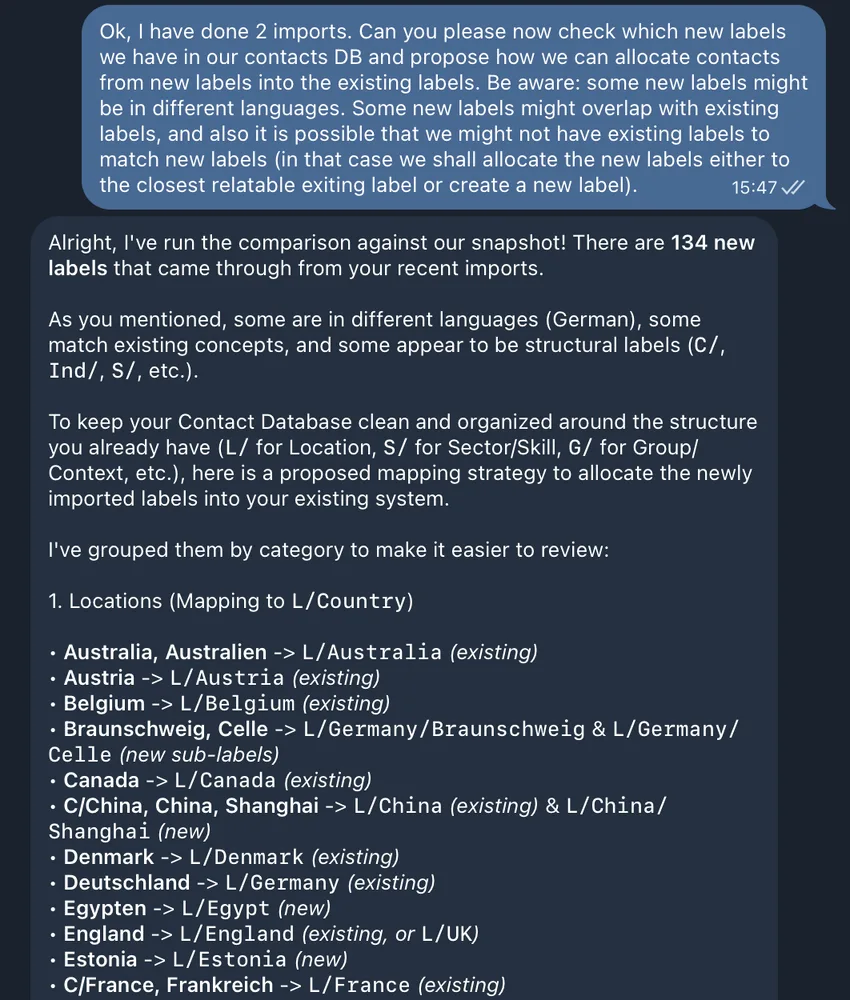
Before & after label structure proposed by Lana AI before doing the merge.
What this actually means
Lana AI started as a solution to one specific problem: losing valuable connections. What it became was something more useful — a system that handles the messy, unstructured reality of how contact information actually arrives, organises it intelligently, and makes a professional network genuinely queryable for the first time.
What I learned is: AI solutions that deliver real value aren't usually the ambitious ones. They're the ones that remove a small, persistent friction from your day — and then quietly keep doing it, every day, without asking anything of you.
What's coming next
What we've covered here is Lana AI in its current form — but there's more in the pipeline.
Next up: automated reminders tied to contact interactions, so that follow-ups don't quietly disappear into a busy week. We're also working on importing contacts directly from LinkedIn, which will bring everything into one coherent, structured database for the first time.
More features are on the way. I'll be covering each one as it moves from concept to implementation — including a full breakdown of what a system like this actually costs to build and maintain.
Now I would love to hear from you: Every practical AI build starts the same way — with a repetitive task that quietly drains time and attention from work that actually matters. Think about your own workday. What is the one task you find yourself doing on repeat — the same steps, every time — that you've always assumed just had to be done manually?
Drop it in the comments. I read every response, and the patterns I see directly shape what we build and write about next.
Frequently Asked Questions
What is a personal CRM AI?
A personal CRM AI is an AI-powered assistant that helps you capture, organise, and retrieve your professional and personal contacts automatically. Unlike traditional CRM software, it accepts unstructured inputs — photos, voice notes, screenshots — and handles categorisation without requiring manual data entry.
What is Lana AI?
Lana AI is a personal CRM assistant built by Renora for business owners and executives. It connects to Google Contacts and uses AI to capture contacts from any input format, label them intelligently, and answer natural language queries about your network.
How does Lana AI capture contacts?
Lana AI accepts screenshots, photos, voice notes, and plain text via Telegram. It extracts the contact's details, assigns labels based on context (such as geography or profession), and adds the contact to Google Contacts — including a cropped profile photo where one is detectable.
Does Lana AI require a separate app or database?
No. Lana AI uses Google Contacts as its storage layer, which means contacts sync automatically across all your existing devices. There is no separate interface to manage — everything lives where it already should.
Can Lana AI understand natural language queries?
Yes. Once contacts are stored, you can ask questions in plain English — such as "who did I meet last week?" or "which contacts in my network work in fintech?" — and Lana AI returns structured, readable answers.
Who is Lana AI built for?
Lana AI is designed for business owners, founders, and executives who network actively and manage a large or geographically distributed contact base. It is particularly useful for anyone who has struggled to capture contacts in real time or found their contact database too disorganised to use effectively.
Want to build something like this for your business?
Every practical AI tool starts with a specific, recurring problem — the kind that quietly drains time every single day. Lana AI started with lost contacts. Yours might be something else entirely.
At Renora, we help business owners and executives turn those problems into tools that work. We consult first — so you know exactly what you're investing in before anything is built.